




Tap when it starts
From the app, the Lock Screen, Control Center or your Apple Watch. The timer runs while you rest.
One tap logs an attack. See your month at a glance, bring your doctor a report. All on your iPhone.


When your head hurts, the app asks for one tap. The details can wait.

One slider. It shapes your summary and the report for your doctor.

Start an attack from the app, the Lock Screen, Control Center or your Apple Watch. Add the details later, or skip them.

Record a dose in a tap. Later, the app asks whether it worked.

Tap the side and the spot. Symptoms and aura are one tap each.

After 12 hours, then after one, two and three days. Four times in all, then it stops.
From the app, the Lock Screen, Control Center or your Apple Watch. The timer runs while you rest.
Where it hurts, symptoms, possible triggers, what you took. Skip any of it. The attack is already saved.
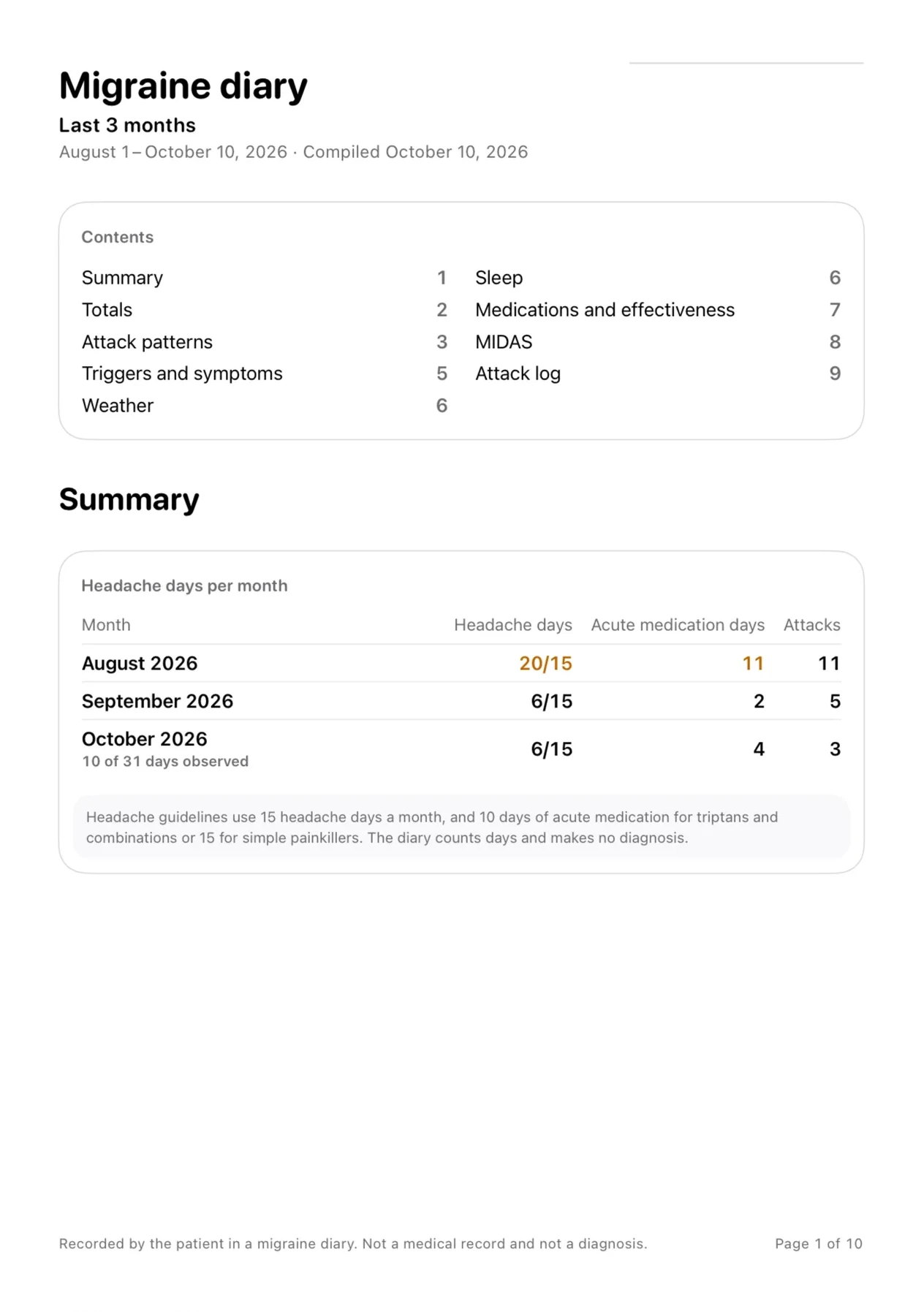
A PDF with headache days and medication days for each month, in your doctor’s language. Part of Pro.
Calendar
Each day is a ring. The longer the arc, the worse the pain. A long attack runs as one band across the days it covered.
October
Sample data
How to read it
See which triggers come up most often before your attacks, in any period back to your first entry. The counts show what happens together, not what causes what.

Answer “Did it work?” after a dose, and the report shows how well each medication worked. It counts medication days per month (days, not tablets) next to guideline thresholds. Reaching one is not a diagnosis.
With your permission, Kephale reads your sleep and period days from Apple Health and sets them beside your attacks. Both stay off until you turn them on. What it reads is never copied into the diary.


With weather recording on, each new attack is saved with the barometric pressure, its 24-hour change, temperature and humidity. Your approximate location goes to Apple, not to us, and isn't kept. Weather data by Apple Weather.
ProWeather recording is free. The pressure report across your attacks is part of Pro.

Start or end an attack and record a dose on Apple Watch. Home and Lock Screen widgets show the time since your last attack. They're marked sensitive, so iOS can hide them on a locked iPhone.
For your doctor
Pro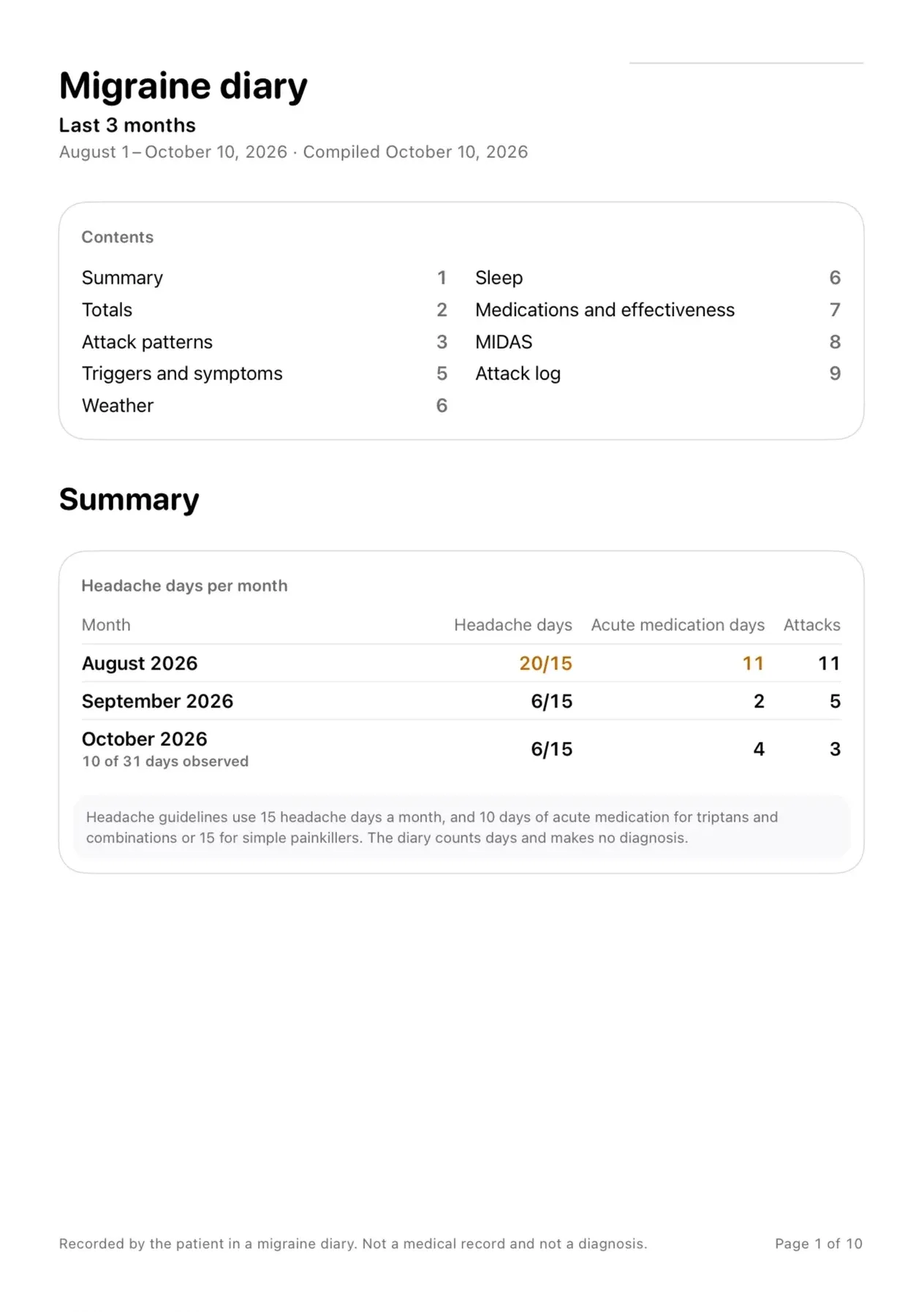
Summary, page 1 of 3
Page one shows headache days and medication days for each month, next to the thresholds headache guidelines use. Triggers, medications and the full attack log follow, in the language you choose. Part of Pro.
How doctors read the reportApple Health and weather stay off until you turn them on. Anything else leaves your iPhone only when you share it yourself.
Read the privacy policyPricing
Your records, the calendar and this month's summary are free for good. Pro adds reports for any period, the PDF for your doctor and color themes.
$0
$19.99per year
$49.99one-time purchase
Can’t find yours? Ask below. We reply by email.
Yes. Logging attacks, the calendar and this month's summary are free for good. Pro adds reports for any period, the PDF for your doctor and color themes.
On your iPhone, in the app's private storage, protected by your device's encryption. There is no account and no cloud sync. Your device backup includes the diary, as it does for any app.
No. It's a diary. It counts what you record and shows it clearly, so you and your doctor can talk about it.
No. Kephale shows what you've already recorded. It doesn't forecast anything.
Only your period days and your sleep. Each has its own switch, and both are off until you turn them on. Nothing else is read.
Nothing is deleted. Your records, the calendar and this month's summary stay. The app goes back to its standard look, and if you renew, your theme comes back.
About the app, the report or Pro. Write to us and we'll reply by email. Please don't include health details unless they're needed to answer.
Free to download. For iPhone, iPad and Apple Watch.